Analytic Endeavors Design - Copyright 2024-2026 Analytic Endeavors Inc. Unauthorized use prohibited.
~30 min read
Delta Format
How data is stored, compressed, and optimized in Microsoft Fabric
Column Store • Delta Tables • Optimizations • Direct Lake
Scroll to explore
Column Store
How analytical data is stored and compressed
Overview
This section explains how analytical data is physically stored — column by column rather than row by row — and the compression techniques that make it fast and efficient.
Column Store
Every Delta table stores its data column by column — not row by row — so analytical queries scan only the values they need.
Run Length Encoding
Instead of storing every repeated value, RLE records each distinct value once alongside how many times it appears — turning repetitive columns into tiny pairs.
Values
3, 3, 3, 3, 3, 3, 3, 3, 3, 3, 5, 5, 5, 5, 5
Described
Ten 3s, Five 5s
Encoded
(10, 3) (5, 5)
Dictionary Encoding
Dictionary encoding replaces repeated string values with compact integer IDs — dramatically reducing the storage footprint of text-heavy columns.
Snappy Compression
Parquet files can use codecs when saving. Fabric uses Snappy by default, a fast, lightweight codec.
Delta
Parquet files plus a transaction log
Overview
This section covers the Parquet file format and how Delta builds on top of it — adding a transaction log that enables versioning, ACID guarantees, and time travel for every table in OneLake.
Parquet
Parquet is the open-source columnar file format underlying every Delta table — it organizes data by column and compresses each one independently for fast, efficient analytics.
Parquet Format
Parquet is an open-source, hybrid columnar format built for analytical workloads — optimized for compression and fast reads, but designed for append-only writes.
Open-source format
Hybrid column based
Great compression available
Better at OLAP vs OLTP
Cannot edit easy – only insert new files
Delta
Delta adds a transaction log on top of Parquet files, giving every table in OneLake versioning, ACID guarantees, and time travel.
Delta Format
Delta is Parquet with a transaction log — every write is recorded as a versioned commit, adding ACID guarantees, time travel, and lineage tracking on top of the columnar format.
Provides ACID functionality
Allows 'Time Travel'
Data Lineage and Debugging
Data Optimization
Optimizations
Write-time and storage-level performance tuning
Overview
This section covers the optimization techniques that keep Delta tables fast — from file skipping and vacuum to V-Order and compression strategies applied at write time and storage level.
File Skipping
Delta stores min/max statistics for every Parquet file in the transaction log — so queries can skip entire files that can't contain matching rows, dramatically reducing the data scanned.
Vacuum
Vacuum removes outdated Parquet files that are no longer referenced by the transaction log — reclaiming storage and keeping tables lean.
V-Order
V-Order is a write-time optimization to the Parquet file format that enables fast reads under the Microsoft Fabric compute engines, such as Power BI, SQL, Spark, and others.
Orders data efficiently when writing (saving), so that it can be read faster.
Optimizations
Write File
RLE, Dictionary & Other Algorithms
Auto optimizations based on the open-source column store format.
V-Order
Optional algorithm for Microsoft-specific tools.
Compression
Choice on how to save file (e.g. Snappy, Gzip).
Optimize Storage
Optimize & Z-Order
Reconstruct files to better compress.
Vacuum
Remove old files to free storage over time.
Direct Lake
Import-speed analytics with live OneLake data
Overview
This section introduces Direct Lake — how Power BI reads Delta tables straight from OneLake into the analysis engine, giving you import-mode speed without data copying or scheduled refreshes.
What is a Semantic Model
A semantic model is the analytical layer that sits between raw data and the end user — it combines a copy of the data with metadata (TMDL) that defines relationships, measures, and business logic.
Semantic Model
contains
Data
A cached copy of the source data
+
Metadata
Relationships, measures, and business logic (TMDL)
Direct Lake
Direct Lake reads Delta tables straight from OneLake into the analysis engine — no data copying, no scheduled refreshes — giving you import-mode speed with live data. Read the full Direct Lake guide →
Architecture
How it all fits together
Overview
This section brings it all together — how Bronze, Silver, Gold, and Semantic layers organize your data from raw ingestion to business-ready analytics.
Medallion Architecture
Bronze
Raw Data
File Format:
Parquet
How it is Stored:
Parquet
Silver
Clean Data
File Format:
Delta Tables
How it is Stored:
Parquet
+
delta log (metadata)
Gold
Curated Data
File Format:
Delta Tables
How it is Stored:
Parquet
+
delta log (metadata)
Semantic Layer
Business Logic
File Format:
Semantic Model
How it is Stored:
(direct lake)
Parquet
+
delta log (metadata)
+
TMDL (metadata)
Data Warehouse
Need help designing your Delta Lake architecture?
We help organizations structure their lakehouse storage for optimal query performance, from partitioning strategy through V-Order optimization.
**On screen:** Section header "Column Store. How analytical data is stored and compressed."
- This section is about **physical storage**, not the model on top of it
- Column-oriented vs row-oriented, plus the compression tricks that make analytics fast
- Animations carry most of the weight; let them play
**On screen:** "Overview" label. Paragraph: "This section explains how analytical data is physically stored — column by column rather than row by row — and the compression techniques that make it fast and efficient."
- Set expectations: physical storage, not modeling
- Mention this is foundational; everything else (Delta, Direct Lake) sits on top of these mechanics
*Transition:* "Start with the column-store idea itself."
**On screen:** "Column Store" label. Animated iframe showing column-by-column storage.
- Every Delta table stores data **column by column, not row by row**
- Analytical queries (sum of revenue, count of orders) only scan the columns they need
- Row-oriented storage (OLTP, like a transactional database) has to read every row even if you only want one column
- Let the animation finish before moving on; it shows the read-pattern difference
**On screen:** "Run Length Encoding" label. Three rows visualizing the same data: Values (10 threes then 5 fives), Described ("Ten 3s, Five 5s"), Encoded ((10, 3) (5, 5)).
- **RLE = Run Length Encoding**
- Don't store every repeated value. Store the value once with a count.
- The 15 numbers on the top row become two pairs on the bottom row
- Works best on **sorted columns with low cardinality**: status flags, country codes, year/quarter
- This is the simplest compression in the column store; everything else builds on it
**On screen:** Second column-store animation (`column-store-02.html`).
- Builds on step 2's column-store diagram
- Shows the compression layers stacking up
- Just play the animation; the visual carries the point
**On screen:** "Dictionary Encoding" label. Animated iframe.
- **Dictionary encoding**: replace repeated string values with compact integer IDs
- "United States," "United Kingdom," "Germany" become 1, 2, 3 (with a tiny lookup table)
- Massive win for **text-heavy columns**: country, product name, customer name
- Combines with RLE: dictionary-encode the strings, then RLE-encode the IDs
**On screen:** "Snappy Compression" label. Note: "Parquet files can use codecs when saving. Fabric uses Snappy by default, a fast, lightweight codec." Animation.
- Compression codec applied **on top of** column-store + RLE + dictionary
- Snappy is Fabric's default: **fast** to compress and decompress, modest compression ratio
- Alternatives like Gzip compress harder but cost more CPU at read time
- Three layers of compression total: column-store organization + encoding (RLE/dictionary) + codec (Snappy)
*Transition:* "All of this so far is just Parquet. Now: Delta."
**On screen:** Section header "Delta. Parquet files plus a transaction log."
- Delta = Parquet **plus a transaction log**
- The log is what gives you versioning, ACID, and time travel
- Parquet alone is append-only; Delta makes it feel mutable
**On screen:** "Overview" label. Paragraph explaining Parquet vs Delta.
- This section covers two things: **Parquet** (the file format) and **Delta** (Parquet + transaction log)
- By the end of this section, the distinction should be crisp: Parquet is files, Delta is files plus a log that makes them act like a versioned table
*Transition:* "Start with Parquet."
**On screen:** "Parquet" label. Animated iframe (`delta-parquet-01.html`).
- **Parquet is open-source.** Not a Microsoft format. Not a Databricks format. Apache project.
- **Columnar.** Each column compressed independently using the techniques from section 1.
- The animation shows the columnar layout; let it play
*Transition:* "Five things to know about Parquet."
**On screen:** "Parquet Format" label. Five feature badges in a row: Open-source format / Hybrid column based / Great compression available / Better at OLAP vs OLTP / Cannot edit easy -- only insert new files.
- **Open-source format** (gray): no vendor lock-in. Same files readable by Spark, Trino, DuckDB, Power BI.
- **Hybrid column based** (teal): columnar overall, but rows grouped into **row groups** for query efficiency.
- **Great compression** (orange): the layered compression from section 1.
- **OLAP vs OLTP** (blue): designed for **analytical** workloads (read many rows, few columns) not transactional (write/update single rows). Don't try to run an OLTP database on Parquet.
- **Cannot edit easy** (red): **append-only**. To update or delete, you write new files and the old files become orphaned. This is the limitation that **Delta solves**.
*Transition:* "Which is exactly why Delta was invented."
**On screen:** "Delta" label. Animated iframe (`delta-parquet-02.html`).
- **Delta = Parquet files + transaction log**
- The log is a series of JSON files (`_delta_log/00000.json`, etc.) that record every write
- Every write becomes a versioned commit; nothing is overwritten in place
- That single addition (a log) gives you versioning, ACID, time travel, lineage
- Let the animation show the log building up
**On screen:** "Delta Format" label. Four feature badges: Provides ACID functionality / Allows 'Time Travel' / Data Lineage and Debugging / Data Optimization.
- **ACID** (orange): Atomicity, Consistency, Isolation, Durability. The properties that turn "a bunch of files" into "a real table."
- **Time Travel** (silver): query a previous version of the table by version number or timestamp. `VERSION AS OF 5` or `TIMESTAMP AS OF '2026-01-01'`. Recover from bad writes; reproduce historical reports.
- **Data Lineage and Debugging** (gold): the log records who wrote what and when. Useful when something breaks at 2am.
- **Data Optimization** (blue): the log enables file-skipping, vacuum, and OPTIMIZE. Section 3 covers these.
*Transition:* "Which brings us to optimizations."
**On screen:** Empty (TODO step in current build).
- This step has no content yet; navigate through to section 3
**On screen:** Section header "Optimizations. Write-time and storage-level performance tuning."
- Two flavors of optimization: **write-time** (applied when data is written) and **storage-level** (applied to existing tables)
- File skipping, Vacuum, V-Order, OPTIMIZE
- All of this is built on top of what the transaction log enables
**On screen:** "Overview" label. Paragraph: "This section covers the optimization techniques that keep Delta tables fast — from file skipping and vacuum to V-Order and compression strategies."
- Four techniques coming, two write-time and two storage-level
- Most happen automatically; a few you trigger manually
*Transition:* "Start with the one that powers fast queries: file skipping."
**On screen:** "File Skipping" label. Animated iframe.
- **File Skipping** uses min/max statistics stored in the transaction log
- For every Parquet file, the log records the min and max value of each column
- When a query has a filter (`WHERE Year = 2025`), the engine checks the log and **skips files whose range can't match**
- Can reduce data scanned by 90%+ on well-partitioned tables
- This is the single biggest reason Delta queries are fast
**On screen:** "Vacuum" label. Animated iframe.
- **Vacuum** removes Parquet files that are **no longer referenced** by the transaction log
- After updates/deletes, old files linger; they're invisible to queries but consume storage
- `VACUUM` (the SQL command) reclaims that space
- Default retention is 7 days (you can read time-travel history within that window before vacuum removes the files)
- Run it periodically; otherwise storage grows without bound
**On screen:** "V-Order" label. Description: "V-Order is a write-time optimization to the Parquet file format" + "Orders data efficiently when writing, so that it can be read faster." Grid of 4 Parquet file icons.
- **V-Order** is Microsoft-specific. Other engines still read the files fine; they just don't get the V-Order benefit.
- Applied at write time: the data is sorted and structured for **fast reads under Fabric engines** (Power BI, SQL Warehouse, Spark, KQL)
- Cost: writes are a bit slower. Benefit: reads are significantly faster.
- On by default in Fabric. You can turn it off if your workload is write-heavy and rarely read.
**On screen:** "Optimizations" summary. Two columns. Left ("Write File"): RLE/Dictionary/Other Algorithms / V-Order / Compression. Right ("Optimize Storage"): Optimize & Z-Order / Vacuum.
- Quick recap of where optimizations sit on the timeline:
- **Write File** (left): happens **when data is written**. Auto-applied. RLE/dictionary from the column store. V-Order (Microsoft-specific). Compression codec like Snappy.
- **Optimize Storage** (right): happens **on existing data**, usually run on a schedule.
- **OPTIMIZE & Z-Order**: rewrites small files into larger ones (file compaction) and co-locates related data (Z-Order) to improve file skipping
- **Vacuum**: removes the orphaned files OPTIMIZE leaves behind
- The pattern most Fabric shops use: write with defaults, schedule OPTIMIZE + VACUUM weekly
**On screen:** Empty (TODO step in current build).
- This step has no content yet; navigate through to section 4
**On screen:** Section header "Direct Lake. Import-speed analytics with live OneLake data."
- This section bridges from physical storage (Parquet/Delta) to **how Power BI uses it**
- Direct Lake is the mode that reads Delta straight from OneLake into the analysis engine
- For depth on Direct Lake itself, the dedicated guide is linked in the step
**On screen:** "Overview" label. Paragraph introducing Direct Lake.
- Set the framing: we've covered the files. Now: how Power BI reads them.
- Two new concepts coming: **semantic model** (the analytical layer) and **Direct Lake** (the connection mode that skips the import step)
*Transition:* "Start with semantic model."
**On screen:** "What is a Semantic Model" label. Diagram: Purple "Semantic Model" badge at top, "contains" connector, two parts below: **Data** (database icon, "A cached copy of the source data") and **Metadata** (TMDL document icon, "Relationships, measures, and business logic").
- A **semantic model** sits between raw data and the user
- It has **two parts**: data and metadata
- **Data**: a cached copy of source data (in Import mode), or a window onto OneLake (in Direct Lake mode)
- **Metadata (TMDL)**: relationships, measures, formatting, business logic. The model layer.
- Same concept as the old Power BI "dataset"; the name changed to "semantic model" in 2024
**On screen:** "Direct Lake" label. Paragraph + animated iframe + link to the dedicated Direct Lake guide.
- **Direct Lake** reads Delta tables straight from OneLake into the analysis engine
- **No data copying.** The "Data" half of the semantic model is a window onto the Delta files, not a cached copy.
- **No scheduled refreshes.** When the Delta table updates, Direct Lake sees the new data on the next query.
- **Import-mode speed.** Queries hit the VertiPaq engine the same way Import does; the data just gets loaded on demand instead of on a schedule.
- For full depth (fallback behavior, requirements, limitations) link to the standalone Direct Lake guide
*Transition (if presenting):* "We won't go deeper here; if you want the full Direct Lake story, the linked guide covers it."
**On screen:** Empty (TODO step in current build).
- This step has no content yet; navigate through
**On screen:** Empty (TODO step in current build).
- This step has no content yet; navigate through
**On screen:** Empty (TODO step in current build).
- This step has no content yet; navigate through to the architecture wrap-up
**On screen:** Section header "Architecture. How it all fits together."
- Final section ties everything together
- Bronze -> Silver -> Gold -> Semantic. The medallion architecture.
- Each layer shows the file format and metadata it uses
**On screen:** "Overview" label. Paragraph: "This section brings it all together — how Bronze, Silver, Gold, and Semantic layers organize your data from raw ingestion to business-ready analytics."
- Set the framing: everything we've covered is a building block; this is the assembled architecture
- Four layers coming, each one a step further from raw data and closer to user-ready analytics
**On screen:** "Medallion Architecture" label. Four columns (Bronze / Silver / Gold / Semantic Layer), each showing icon, name, subtitle (Raw / Clean / Curated / Business Logic), file format, and storage detail. Sub-step click-through: each column's details reveal one at a time as you advance.
- This slide has **four sub-reveals**: each click advances one medallion column
- **Bronze (Raw Data)**: just Parquet. Lands as-is from the source. No transformation, no schema enforcement, no log. Sometimes Bronze isn't even Delta yet; it can be raw Parquet.
- **Silver (Clean Data)**: Delta now (Parquet + delta log). Schema enforced. Deduplicated, joined, typed. This is where most modeling logic lives.
- **Gold (Curated Data)**: Delta still. Business-aggregated. The slice of data that powers a specific report or use case. Stable schema; refreshed on a cadence.
- **Semantic Layer (Business Logic)**: Parquet + delta log + **TMDL metadata**. The semantic model from section 4. "(direct lake)" note on this column because Semantic over Direct Lake is the modern pattern: query Gold Delta tables straight from the semantic model.
- Let each column reveal. Don't rush; this is the synthesis slide.
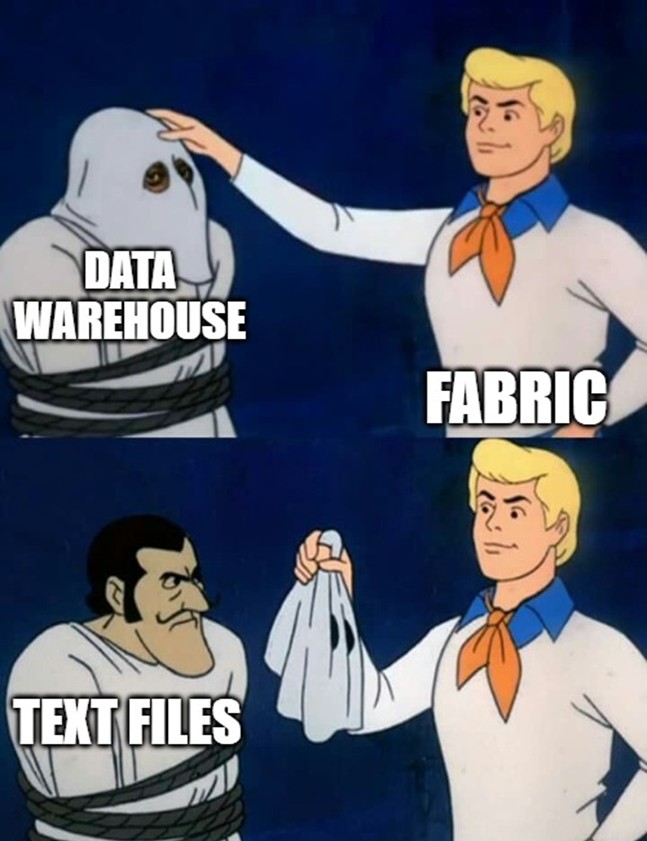
**On screen:** "Data Warehouse" label. Scooby-Doo meme image: Fred (labeled "Fabric") unmasking a "Data Warehouse" ghost to reveal "Text Files" underneath.
- Land the joke. The "warehouse" we've been talking about all along is **just well-organized text files** (Parquet under the hood)
- The point: there's no magic. The performance comes from file format, organization, and the log. No proprietary binary database.
- That's the whole guide. Questions?
Discussion